 B2BStore
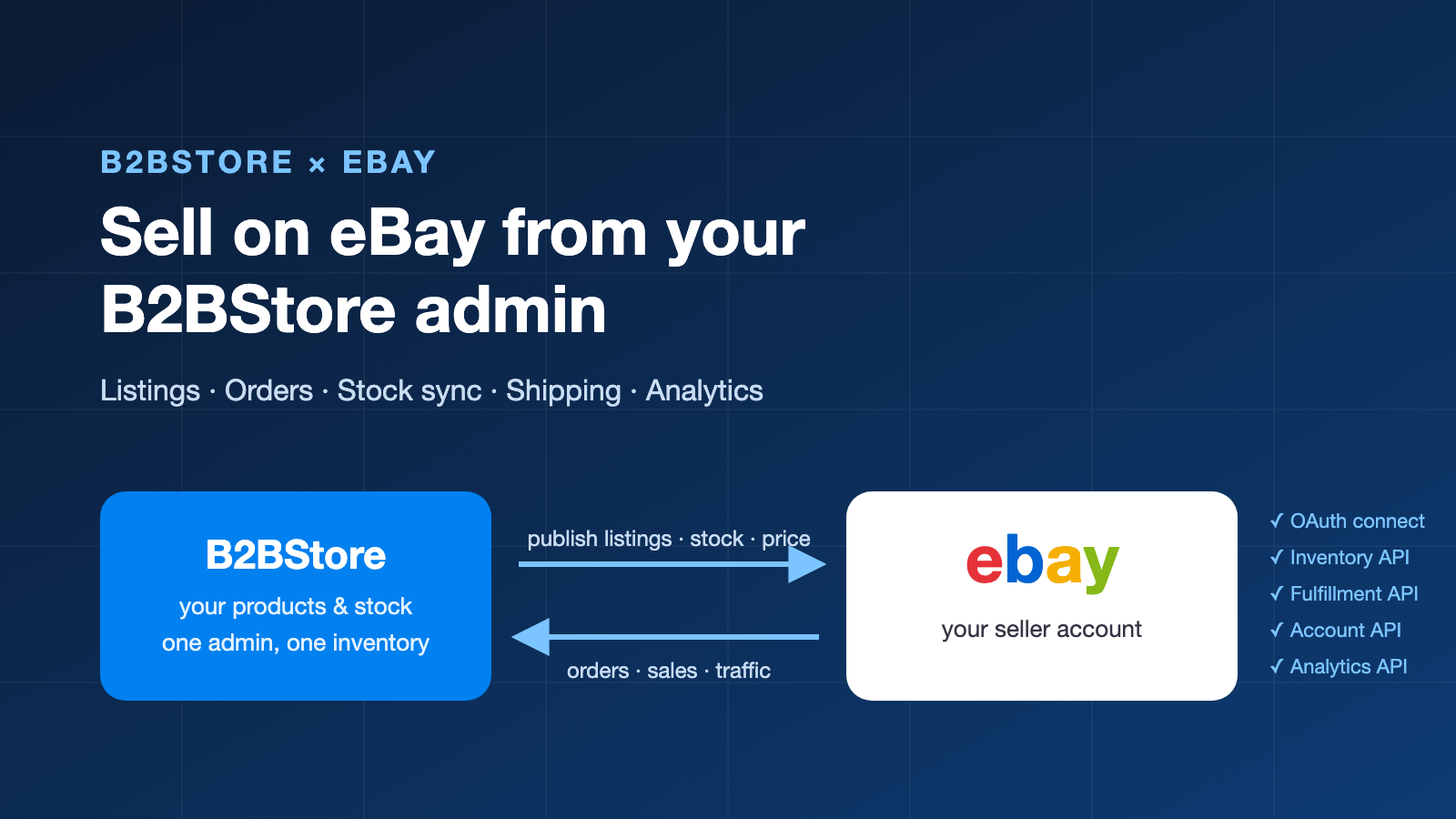
B2BStore has a built-in eBay integration. Merchants who run their online store on B2BStore can list products on eBay, receive eBay orders, keep stock in sync and ship with tracking, all from the same admin they already use for their own storefront. This guide explains what the integration does, how to set it up, and how it works behind the scenes.
Who this is for
- B2BStore merchants who already sell on their own storefront and want to reach eBay buyers without managing a second catalog.
- Existing eBay sellers who want one place for products, stock and orders across eBay, their own website and other marketplaces.
- Prospective sellers who are new to eBay and want a guided way to create their first listings with the right category, item specifics and policies.
What the eBay integration does
| Feature | What the seller gets | eBay API used |
|---|---|---|
| Connect account | Sign in to eBay and approve access in one click. No developer account or keys. | OAuth 2.0, Identity |
| Listings | Publish B2BStore products to eBay with photos, description, category, item specifics and price. Colours and sizes become one multi-variation listing. | Inventory, Taxonomy |
| Business policies | Pick your eBay shipping, payment and return policies and a ships-from location inside B2BStore. | Account, Inventory (locations) |
| Orders | eBay orders appear in the normal B2BStore Orders list, matched to your products, colours and sizes. | Fulfillment |
| Shipping & tracking | Enter the carrier and tracking number once. The order is marked shipped on eBay and the buyer is notified. | Fulfillment |
| Stock sync | One inventory per colour × size. A sale anywhere lowers stock everywhere, which prevents overselling. | Inventory (bulk price & quantity) |
| Analytics | eBay sales, units, impressions and listing views for 7, 30 or 90 days, alone or combined with your other channels. | Analytics |
How B2BStore connects to eBay
B2BStore runs a single eBay application for the whole platform. Each merchant connects their own eBay seller account to it with eBay's standard OAuth consent screen. B2BStore stores the resulting tokens for that store only and refreshes them automatically. The merchant never handles API keys.
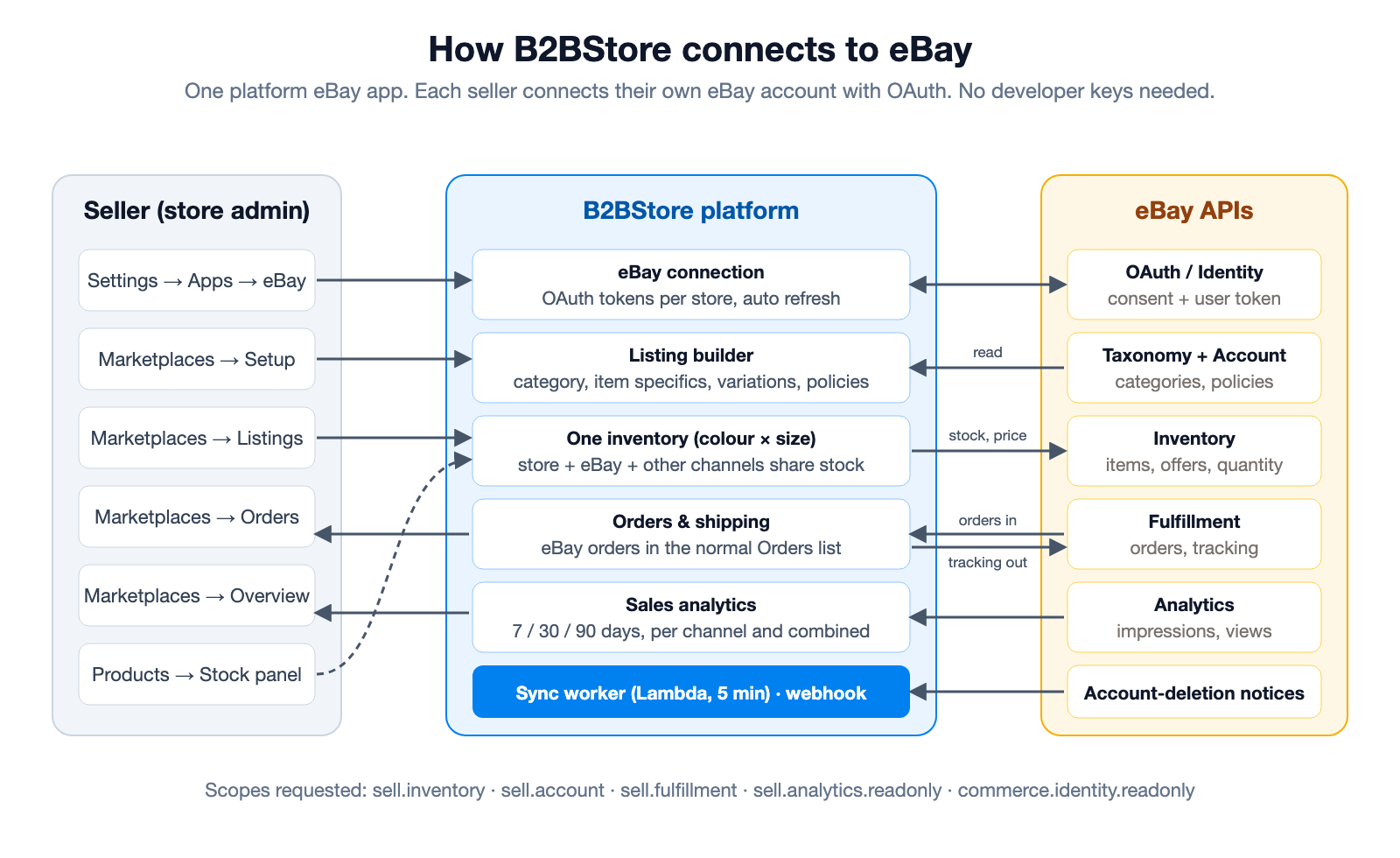
A background sync worker on AWS Lambda checks every connected store for new and changed eBay orders every five minutes. Sellers can also press Sync now at any time. The worker runs off the store server, so it never slows down the merchant's storefront.
Step-by-step setup
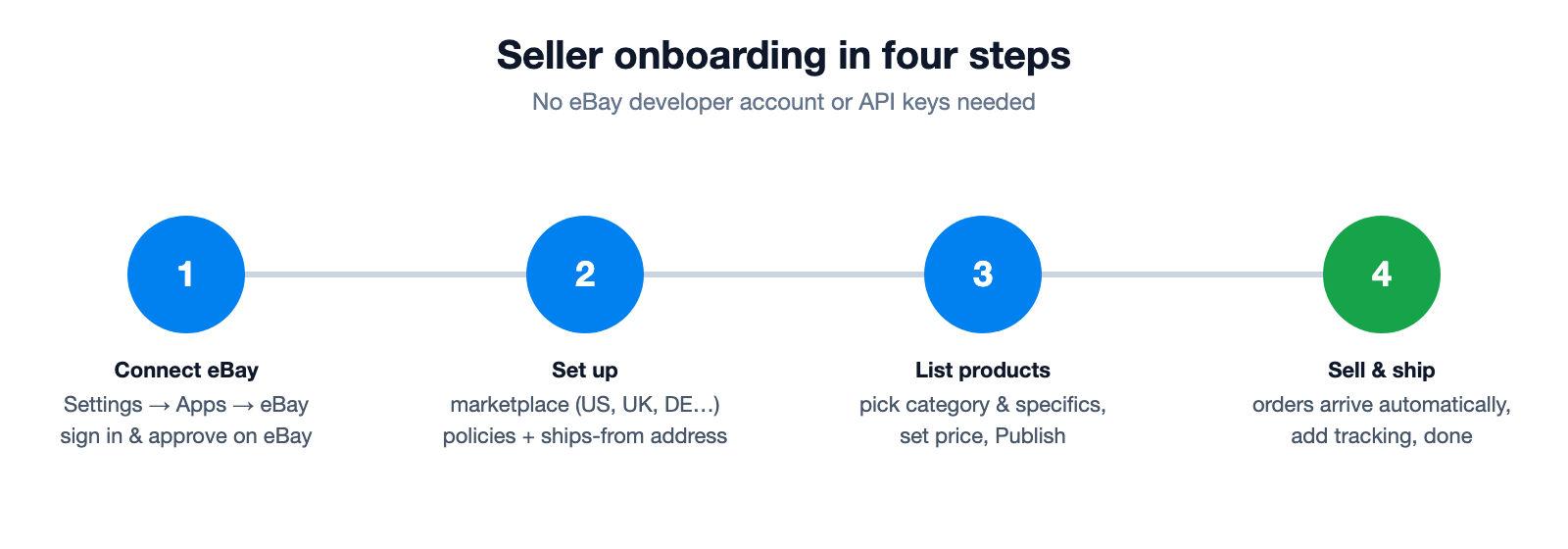
1. Connect your eBay account
- In your B2BStore admin, open Settings → Apps and click Connect on the eBay card.
- eBay asks you to sign in and approve B2BStore's access. Approve it.
- You return to B2BStore with eBay shown as Connected.
You can disconnect at any time from the same card. Disconnecting deletes the stored eBay tokens straight away.
2. Choose your eBay site, policies and location
Open Marketplaces → Setup and choose:
- eBay site: United States, United Kingdom, Germany, Australia, Canada, France, Italy or Spain.
- Business policies: your shipping (fulfillment), payment and return policies. If your eBay account hasn't opted in to business policies yet, B2BStore can opt you in with one click. If you only have one policy of a type, it's picked for you.
- Ships-from location: the address your items ship from. You can create it on this screen.
3. List your products
Open Marketplaces → Listings, or use Push to marketplaces on any product, and pick the products to sell on eBay.
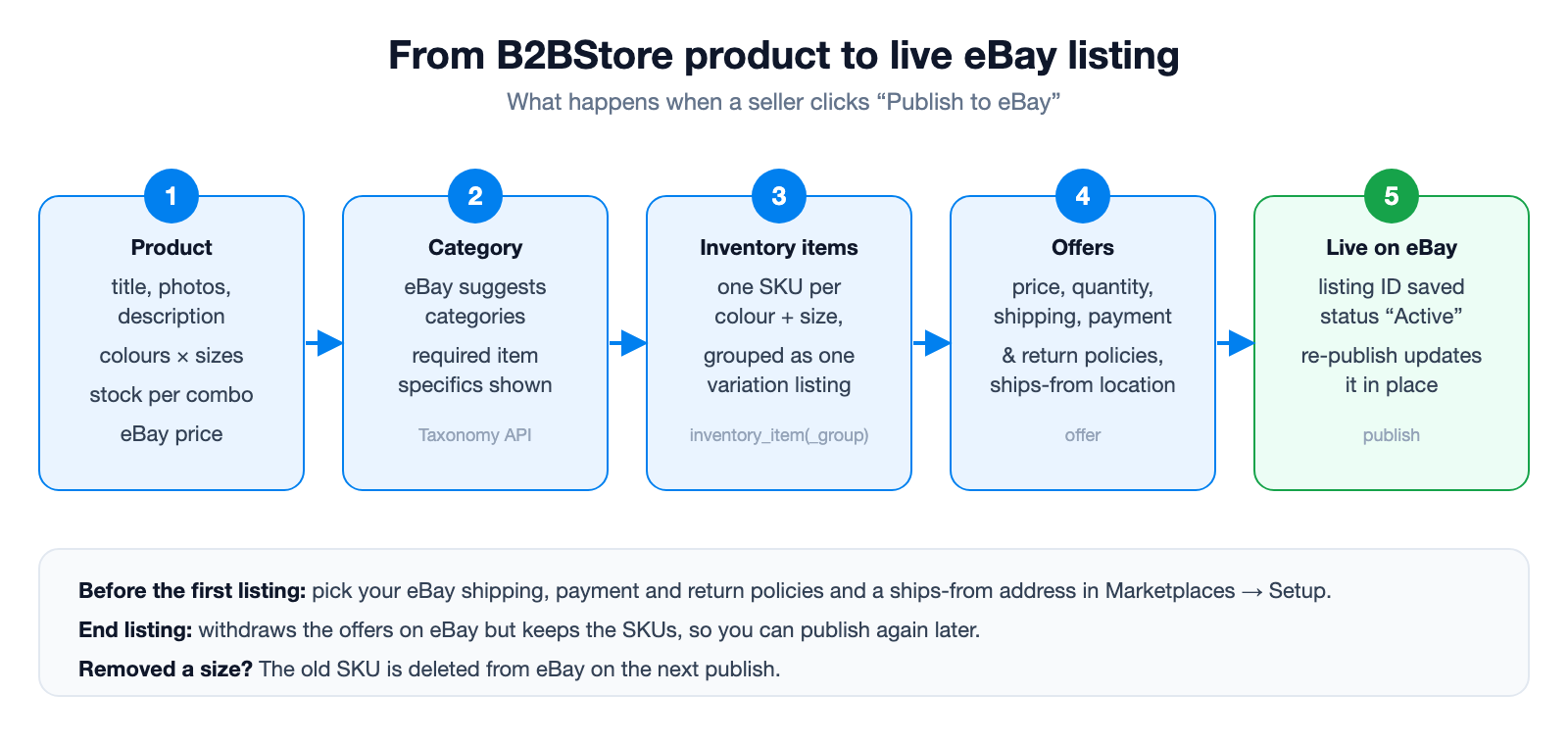
- Category: type a few words and eBay suggests matching categories, with their full path.
- Item specifics: B2BStore loads the required and recommended specifics for that category, so you fill in exactly what eBay expects.
- Price: set an eBay price, which can differ from your storefront price.
- Variations: every colour and size becomes its own SKU, grouped into one multi-variation listing, so buyers pick options on a single page.
- Made-to-order products: if you don't track stock for a product, set a fixed quantity to show on eBay.
Click Publish. The listing gets its eBay listing ID and the status Active. Editing and publishing again updates the same eBay listing in place. End listing takes it off eBay but keeps everything, so you can publish it again later.
4. Sell, ship and track
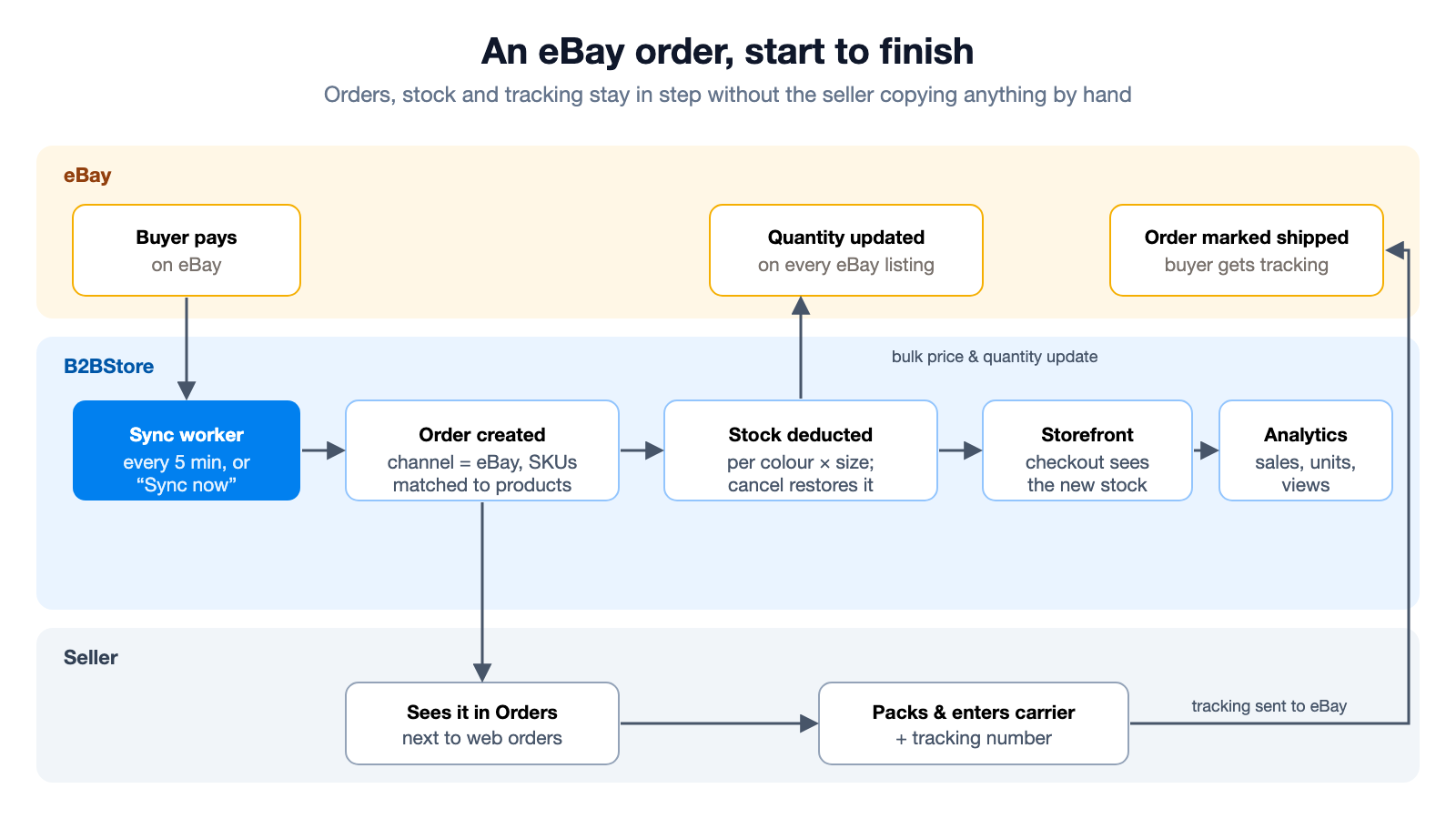
- A buyer pays on eBay.
- Within five minutes, or straight away with Sync now, the order shows up in Orders marked as an eBay order. Each line is matched to the right product, colour and size.
- Stock goes down for that colour and size. B2BStore then sends the new quantity to every eBay listing of that product, and your own storefront checkout sees the same number.
- You pack the order and enter the carrier and tracking number on the order page.
- B2BStore marks the order as shipped on eBay with that tracking number, and eBay notifies the buyer.
If an order is cancelled, its stock is put back automatically.
One inventory across every channel
Stock in B2BStore is tracked per product, colour and size. Your storefront, eBay and any other connected marketplace all draw from those same numbers:
- Online storefront orders deduct stock when payment succeeds, and cash-on-delivery orders when they're placed.
- Marketplace orders deduct stock when they're imported.
- After any change, quantities and prices are pushed to eBay in bulk, up to 25 SKUs per request.
The result: you never sell the same last item twice on two channels.
Sales analytics
Marketplaces → Overview shows revenue, orders and units for the last 7, 30 or 90 days, compared with the previous period. For eBay it also shows listing impressions, listing views and views per day from eBay's traffic report. You can view eBay alone or combined with your other channels to see where your sales come from.
Security and privacy
| Permission (OAuth scope) | Why B2BStore needs it |
|---|---|
sell.inventory | Create and update listings, quantities, prices and ships-from locations |
sell.account | Read your business policies and opt in to them |
sell.fulfillment | Import orders and send shipping tracking |
sell.analytics.readonly | Show listing impressions and views |
commerce.identity.readonly | Show which eBay account is connected |
- Tokens are stored per store and are only used for that store's own eBay account.
- B2BStore uses only official eBay REST APIs. It doesn't scrape eBay and doesn't ask for your eBay password.
- B2BStore handles eBay's Marketplace Account Deletion notifications. When eBay reports that a user's account was deleted, that user's personal data is removed from every store, and any store connected with that account is disconnected.
- Read the Privacy Policy and the data deletion page.
Troubleshooting
| Message | What to do |
|---|---|
| “Choose an eBay category.” | Search for a category on the listing and pick one of eBay's suggestions. |
| Missing a shipping, payment or return policy | Open Marketplaces → Setup and choose one of each. If none appear, create them in eBay Seller Hub or use the opt-in button. |
| Missing ships-from location | Create a location in Marketplaces → Setup. |
| eBay shows as disconnected | Access was revoked or expired. Click Connect in Settings → Apps again. Your listings and settings are kept. |
| Stock update failed for a SKU | The listing page shows the SKU and eBay's reason. Fix the product, then publish again. |
Frequently asked questions
Do I need an eBay developer account to use B2BStore with eBay?
No. B2BStore has its own eBay application. You only sign in with your normal eBay seller account and approve access.
Which eBay sites can I sell on?
eBay US, UK, Germany, Australia, Canada, France, Italy and Spain. You choose the site in Marketplaces → Setup.
Can I sell products with colours and sizes?
Yes. Each colour and size becomes its own SKU with its own stock, and they're grouped into one multi-variation eBay listing.
Will eBay sales change the stock on my own website?
Yes. B2BStore keeps one inventory. An eBay sale lowers stock for your storefront and other channels, and a storefront sale lowers the quantity on eBay.
How quickly do eBay orders appear in B2BStore?
Within about five minutes, or straight away if you click Sync now on the Orders tab.
Can I import listings I already have on eBay?
B2BStore publishes listings from your B2BStore products. Listings created directly on eBay aren't changed. Orders for products you published through B2BStore are matched to your catalog automatically.
What happens if I disconnect eBay?
B2BStore deletes the stored eBay tokens and stops syncing. Your products, past orders and listing settings stay in B2BStore, so you can reconnect later.
Does B2BStore support other marketplaces?
Yes. Etsy, Walmart and Amazon use the same Marketplaces screen and share the same inventory, so you can manage all of them in one place.